Interior design project management is the work of moving a design from brief to handover on time and on budget, while keeping the client, your team, vendors and contractors working from the same decisions. In practice, it comes down to clear stages, one owner for each task, recorded approvals and a single place to find the latest information.
Most projects don't go wrong because of poor design. They go wrong when a contractor builds from an old drawing, an order is placed before the client has agreed, or nobody can remember who approved a change. This guide covers the systems that prevent those problems, whether you work alone or run a growing studio.
What does a project manager do in interior design?
An interior design project manager keeps the job moving so designers can concentrate on design. In a small studio, that person is often the principal or a senior designer. The title matters less than making sure these responsibilities belong to someone:
- Scope: confirming what is included and what counts as a change.
- Schedule: setting dates, tracking lead times and spotting delays early.
- Budget: comparing quotes and orders against the agreed budget.
- Approvals: getting client decisions and recording them.
- Coordination: keeping vendors, contractors and consultants up to date.
- Quality: reviewing drawings before they leave the studio and work on site before handover.
Do interior designers do project management themselves? Very often, yes. Many clients expect it, so decide early whether it's included in your fee or charged separately, and put that in your proposal.
Why interior projects are hard to manage
A general task app can handle a to-do list, but interior projects have a few complications of their own:
- Decisions depend on each other. A changed tile can affect the budget, the lead time and the drawings.
- Clients decide in stages. Each decision can feel small to them, while the cost of reversing it grows as the project advances.
- Many outside parties are involved. Vendors and contractors work to their own schedules, often outside your systems.
- Information gets scattered. Drawings sit in one folder, approvals in a chat and budgets in a spreadsheet.
Six systems every studio needs
1. A defined set of stages
Give every project the same route from start to finish. Each stage needs a checklist and a clear condition for moving on. Your team then always knows where a project stands, and clients know what's coming next. If you're setting this up for the first time, start with our guide to the interior design process.
2. A single owner for every task
"The team will handle it" usually means nobody will. Each task needs one named person and a due date, even when several people contribute. When a task is waiting on someone else, record who it's waiting on. A list of everything waiting on clients makes your next client call much more useful.
3. Drawing version control
Use a consistent revision system, such as R1, R2 and R3, and keep the reason for each revision. Separate the two approvals that are often confused:
- Internal approval means your lead has checked it and it can go to the client.
- Client approval means the client has agreed and it can go to site or to a vendor.
Nothing should reach a contractor until both have happened. That one rule prevents a large share of expensive site mistakes.
4. A recorded approval trail
For each decision, record what was approved, who approved it, when, and where the proof is. An email reply or a signed form both work, as long as you can find it six months later. If a dispute comes up, a clear record is far easier to rely on than anyone's memory.
5. Meeting notes with actions
After each meeting, send short minutes covering who attended, what was decided and who will do what by when. Add the actions to your task list right away so they don't stay buried in the notes.
6. A materials and vendor record
Track each selection by room, along with its vendor, status and approval. Keep your vendors' details in one shared list, so a contact doesn't leave the business when a team member does.
A simple way to run a project week to week
| When | What to do | Why it matters |
|---|---|---|
| Start of the week | Review open tasks and anything due within seven days | Catches problems while there's still time to fix them |
| Before client contact | Check everything waiting on that client | Lets you ask for every decision at once |
| After every meeting | Send minutes and add the actions | Turns conversation into owned work |
| Before issuing a drawing | Check its revision and approval status | Keeps old versions away from site |
| End of each stage | Complete the checklist and record the approval | Stops the next stage starting on unsettled decisions |
Common mistakes to avoid
- Starting detailed work before the concept is approved. If the direction changes, that work has to be redone.
- Treating a verbal yes as approval. Follow every spoken decision with a written confirmation.
- Absorbing changes for free. Log each change and its effect on cost and time, and agree it before doing the work.
- Keeping the plan in one person's head. If the project can't continue while that person is away, the system isn't working yet.
- Ordering before checking lead times. One late item can hold up other trades on site.
Spreadsheet, general app or dedicated software?
| Option | Works well when | Where it struggles |
|---|---|---|
| Spreadsheets and chat | You work alone and handle very few projects | Approvals and versions get scattered, and it depends on discipline |
| General project apps | You're happy to build and maintain your own setup | Stages, drawing revisions and materials aren't built in |
| Interior design software | You run several projects with a team | It costs more, and your team needs time to adopt it |
Whichever you use, test it with one real project before moving everything across. The best system is the one your team keeps updated when they're busy.
How Nook fits in
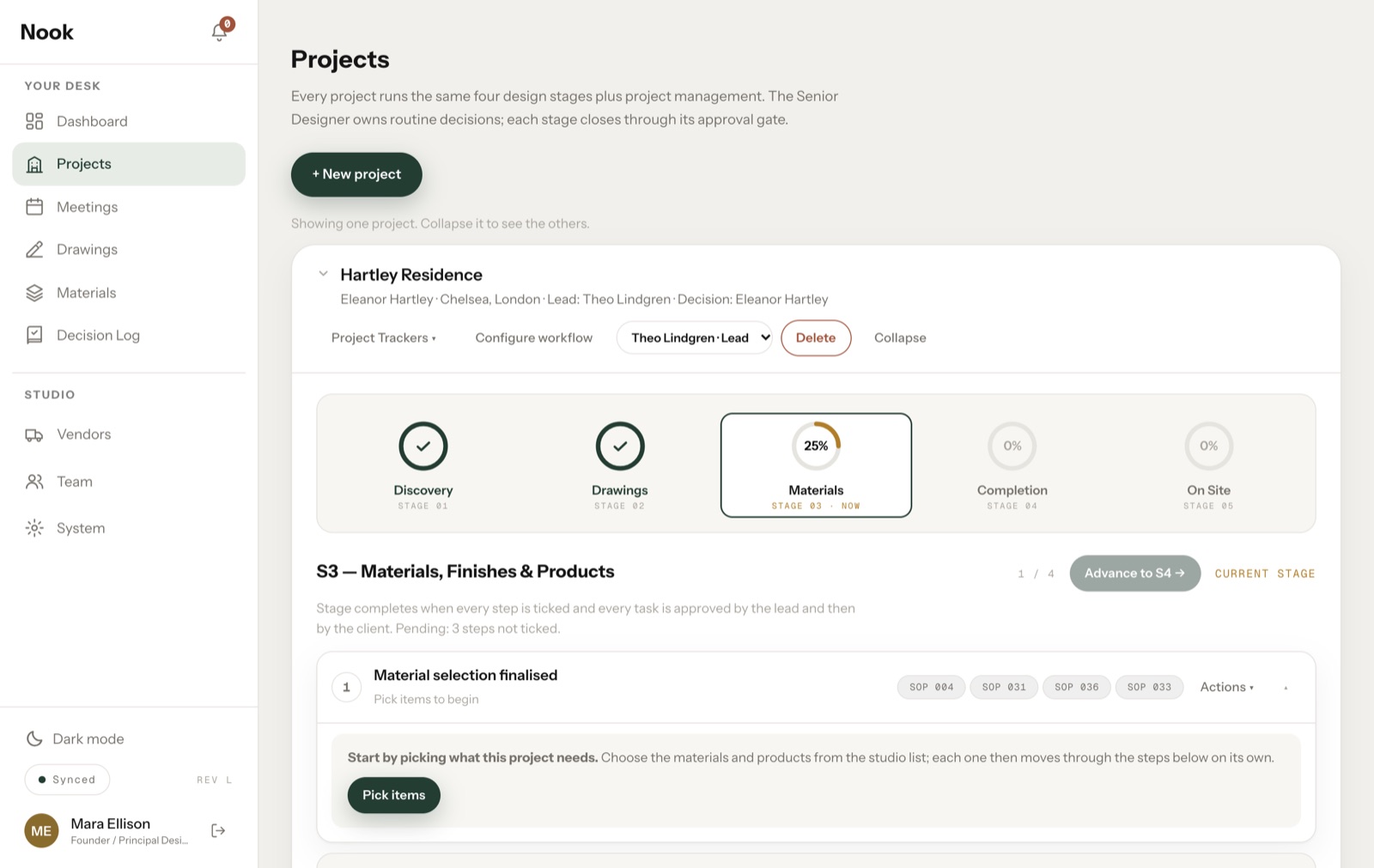
Nook is project management software we're building for interior design studios, around the systems in this guide. It covers stages with checklists and approvals, drawing revisions, materials, meetings, a decision log and vendors. It's in daily use by a design studio team of seven, and we're now preparing it for more studios through early access.
Frequently asked questions
Can an interior designer become a project manager?
Yes. Designers already understand drawings, materials and clients, which is a strong base. The skills to build are scheduling, budget tracking and managing contractors. Taking responsibility for the coordination of a small project is a practical place to start.
What should be tracked on every interior design project?
At minimum: the current stage, open tasks and their owners, the latest drawing revisions, approved materials, budget against spend, and decisions with their approvals.
When should a studio start using project management software?
A good sign is when you can no longer answer "what's waiting on whom?" without checking several places, or when more than one person is working on each project.